Invitation Maker-Card Creator
- 4.8
- Rating
- 1.00M
- Installs
- Free
- Price

 Analysis by App-foxy
I like invitation apps that let me get from an idea to something shareable without turning a simple event into a design project. Invitation Maker-Card Creator is aimed at exactly that space: it is an Events app for making invitation cards for birthdays, weddings, Christmas gatherings, and other occasions. After spending time with it, my impression is that it works best as a quick visual starting point rather than as a full event-management system. Its real appeal is the balance between speed and personal presentation.
The app is free to install, has an Everyone content rating, and is maintained by Battery Stats Saver. It has been available since May 4, 2020, and the current version is 2.1.3. Those details matter because this is the sort of tool people often open in a hurry: a party date changes, a family member asks for an invitation, or a seasonal gathering needs something more polished than a plain message. I found the concept easy to understand, even though the practical experience depends on how much time I want to spend refining the card.
How Invitation Maker-Card Creator feels in everyday use
I find the everyday appeal of Invitation Maker-Card Creator lies in giving an occasion a visual form without making me plan the entire event inside one app. In this section, I look at how I’d shape a card around its audience and avoid common last-minute mistakes; next, I’ll consider the choices and checks that matter before sharing it.
You May Also Like

 Blood Strike: 2.5 Anniversary
Blood Strike’s Loadouts Turn Every Drop Into a Tactical Gamble
A close look at Blood Strike’s custom loadouts: how fast access to signature weapons reshapes its battle royale rhythm, rewards preparation, and narrows the gap between fights.

 Pandora - Music & Podcasts
Pandora’s Music Is Easy to Start, but Harder to Recover
Pandora’s strength is its low-effort path from a seed to a station. Its weak spot is how much confidence it asks you to place in connection, setup, and quiet recovery.

 8 Ball Pool
 Is Built on Rivalries, Rematches, and Routine
A close look at the rivalries, rematches, shared routines, and unanswered safety questions that turn a quick pool match into a persistent mobile community.

 Samsung Music
’s Quiet Strength Is Playing What You Already Own
Its reach comes less from spectacle than from dependable access to a personal library. That simplicity is both the app’s strongest retention engine and its ceiling.

 AccuWeather: Weather Radar
AccuWeather Review: A Quick, Clear Forecast for Everyday Decisions
For everyday plans, the best forecast is the one you can understand quickly. AccuWeather makes rain timing, radar, and local conditions easy to act on, with a few trade-offs.

 Hill Climb Racing
Why Hill Climb Racing Still Turns Crashes Into One More Run
A tiny car, a bumpy hill and one more upgrade: Hill Climb Racing keeps resurfacing because its simple chaos makes every near-miss feel personal.
More From Our News Desk



A quick route from event idea to invitation
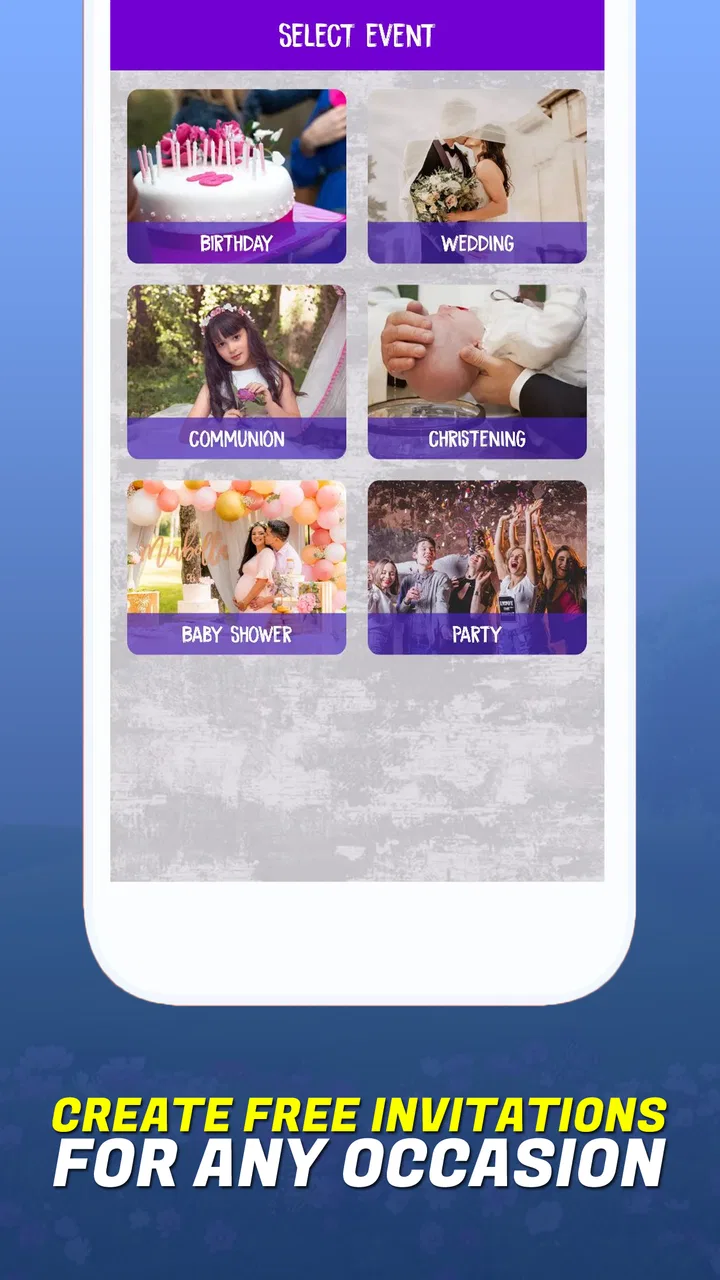
The most useful way to approach this app is to treat it as a visual card creator. Instead of composing a long announcement from scratch, I can begin with the occasion in mind and shape a card around it. That makes sense for a birthday announcement, a wedding-related invitation, a Christmas dinner, or a casual gathering where the image needs to carry some of the mood.
I would not install it expecting guest lists, reminders, RSVP tracking, venue management, or a shared planning workspace. Its purpose is narrower and clearer: create an invitation card. That focus is a strength when I only need a presentable graphic, but it also defines the point at which I would switch to another tool. For managing attendance or coordinating several people, a calendar, messaging service, or dedicated event platform is more suitable.
The workflow is particularly practical when the invitation will be sent through a chat app or posted in a social feed. A designed card can communicate the occasion at a glance, while a text-only message may be overlooked. I also see value in using it for people who are not comfortable with desktop design software. The mobile format keeps the task closer to writing a message than producing a formal document.
Speed expectations during a rushed invitation
My expectation for this app is quick visual assembly, not instant perfection. The basic idea is simple enough that I can choose an occasion, work on the card, and prepare something that looks more intentional than a copied greeting. The time-saving benefit comes from starting with a designed invitation instead of facing an empty canvas.
That distinction is important. A first draft can be fast, but a card may still need careful checking before I send it. Names, dates, times, addresses, and wording deserve a second look because a visually attractive invitation can still be unusable if one important detail is wrong. I recommend creating the text first in a note, then transferring it into the card. That small habit reduces the chance of losing time correcting a typo after the design is nearly finished.
For a last-minute birthday message, I would keep the wording short: the person’s name, the occasion, the date, the location, and a simple request to confirm. For a wedding invitation, I would allow more time because the tone and details usually matter more. The app can help with the card’s presentation, but it cannot decide whether the wording is appropriate for a formal or informal audience.
What happens when the app is used repeatedly
Light use and heavy use are different experiences. Creating one invitation for a family event is a small task. Producing several variations for different groups, revising wording repeatedly, or preparing cards for multiple occasions creates more opportunities for friction. The work becomes less about opening the app and more about keeping versions organized.
My practical advice is to finish one complete card before experimenting with alternatives. If I change the design, wording, and occasion at the same time, it becomes harder to know which version is ready. For a large guest group, I would also keep a plain-text copy of the final invitation separately. That gives me a backup for people who prefer receiving details directly and protects the essential information if I need to recreate the card.
Another useful workflow is to make separate cards for genuinely different audiences rather than trying to make one design serve everyone. A family invitation can be warm and relaxed, while a workplace gathering may need clearer wording and a more restrained appearance. The app is most helpful when I use its visual format to support the audience, not when I force every event into the same style.
Stability and recovering from mistakes
For an invitation creator, reliability is not only about whether the app opens. It is also about whether I can recover from a mistake without rebuilding the whole card. I pay attention to that because invitation work often happens close to a deadline, when losing a draft is more frustrating than losing a casual social post.
I recommend saving or exporting a satisfactory version as soon as the main details are correct, rather than waiting until every decorative change is finished. I would also avoid making the only copy of important event information inside an unfinished design. Keeping the wording in a note gives me a simple recovery path if I close the app, change my mind, or need to start again.
The app’s rating is a positive signal for people considering a download: it holds an average of 4.8 from around ten thousand ratings, with 46 written reviews shown alongside that feedback. It has also passed one million installs, which suggests that it is not an obscure experiment. Still, popularity does not guarantee that every device or every editing session will feel identical. I would judge it by whether it fits my own phone, storage situation, and preferred way of sharing cards.
Device constraints and practical expectations
The minimum operating system is Android 8.0, so compatibility is reasonably broad among devices that are still in regular use. That does not mean every phone will feel equally comfortable. A smaller display can make text placement and detail checking less convenient, while an older device may make repeated editing feel less pleasant than a newer one.
I would be especially careful on a phone with limited free storage or a crowded photo library. Invitation work is visual, and keeping several drafts or exported cards can make organization harder even when the app itself is not demanding. A simple folder for finished invitations and another for temporary versions can prevent the common problem of sending an outdated card.
Battery use is also worth considering during a long design session. I would not treat a short invitation as a major resource burden, but heavy editing, repeated previews, and switching between the creator and other apps can be more noticeable on an older phone. If I were preparing cards for a wedding or a large event, I would do the final editing while connected to power rather than leaving it until the last few minutes.
The app is free, which makes trying it low-risk. It does include in-app purchases ranging from $0.99 to $99.99 per item, so I would pay attention to any purchase prompt and decide whether the available free workflow is enough before committing money. For someone creating an occasional birthday card, the free entry point may be all that is needed. A frequent user should consider the cost of optional items as part of the long-term choice, especially if another design tool already provides the required flexibility.
Where it compares well with ordinary alternatives
The most obvious alternative is a plain text message. Text is faster when the only goal is to communicate logistics, but a card created in this app can make the invitation feel more deliberate. That difference matters for birthdays, holiday gatherings, and personal celebrations where atmosphere is part of the message.
Another alternative is a general-purpose design editor. Such tools may offer deeper control, but they can also require more decisions before a usable invitation appears. Invitation Maker-Card Creator is more appealing when I want a focused result and do not want to learn a broad design system. The trade-off is that a specialized card app may feel limiting if I need unusual layouts, detailed branding, advanced image work, or a carefully controlled print design.
Printed invitations are a different comparison altogether. A digital card is convenient for guests who already communicate by phone, while printed stationery can feel more formal and tangible. I would use this app for speed, informal sharing, and quick revisions. I would choose a print-focused workflow for an event where paper quality, physical delivery, or ceremonial presentation is central.
Who will get the most from it
This app suits people who want a polished invitation without spending a long time learning design software. It is a sensible option for parents preparing a child’s birthday announcement, couples creating a simple wedding-related card, families organizing a Christmas meal, or anyone who wants a more thoughtful-looking message for a personal event.
It is also useful for small organizers who need several cards with slightly different wording. For example, I could prepare one version for close family, another for friends, and a shorter reminder for people who already received the main invitation. The key is to keep the event details consistent and change only what the audience actually needs.
I would skip it if my main requirement is event administration rather than visual communication. People who need registration forms, attendance counts, automatic reminders, ticketing, collaborative planning, or detailed guest records should look elsewhere. I would also choose a broader design application if the invitation must match a strict brand system or be prepared for professional printing.
Small habits that make the result better
My first tip is to separate design decisions from information decisions. Before opening the editor, decide the exact wording and confirm the date, time, and location. This keeps the creative part from distracting me from the details guests actually need.
My second tip is to check the card at the size in which recipients are likely to see it. A detail that looks clear while editing may be less comfortable to read on a phone screen. I would keep essential information visually distinct and avoid making guests search through decorative wording to find the practical details.
My third tip is to create a final review routine: read the invitation aloud, check names character by character, verify the event time, and send a test copy to myself or a trusted contact. This is especially valuable for wedding invitations and group events, where correcting a mistake after distribution can be awkward.
Finally, I would preserve the finished wording outside the app. That is not glamorous, but it is the most useful recovery measure. If I need a second version, a reminder, or a plain-text message for someone who cannot view the card, I can reuse the confirmed information without relying on memory.
My performance verdict
Invitation Maker-Card Creator makes sense when I want a focused, mobile-friendly way to turn event details into a visual invitation. Its strongest quality is not that it replaces every other event tool; it is that it gives a simple occasion a more personal presentation than a bare message. The free starting point and broad Android compatibility make it easy to test, while the strong average rating and large install base provide encouraging context for new users.
My overall view is positive, with realistic limits. I would use it for birthdays, seasonal gatherings, and informal celebrations where speed and appearance matter more than advanced administration. I would be more cautious for a formal wedding workflow, a professional event, or anything requiring detailed guest management. In those cases, I would pair the card with another service or choose a more specialized alternative.
The best reason to try it is convenience with a personal touch. If I prepare the wording first, save a safe copy, review the final details, and treat the app as a card creator rather than a complete event platform, it can be a practical addition to my phone. For quick invitations that should look considered without becoming a major project, it earns a place on my shortlist.
FAQs for Invitation Maker-Card Creator
01What features does Invitation Maker-Card Creator offer?
Invitation Maker-Card Creator provides a wide range of customizable templates for various occasions such as weddings, birthdays, and parties. Users can personalize text, colors, and images. The app also allows for the addition of stickers and backgrounds, ensuring each invitation is unique and tailored to the user's needs.
02Is the app free to use, or are there any in-app purchases?
While Invitation Maker-Card Creator offers a selection of free templates and features, there are premium options available through in-app purchases. These include access to exclusive templates, advanced editing tools, and the removal of ads, enhancing the overall user experience.
03Can I share my invitations directly from the app?
Yes, the app provides seamless sharing options. Users can send their invitations via email, social media platforms, or messaging apps directly from the app. This makes it easy to reach guests quickly and efficiently without needing to save and share files separately.
04Is Invitation Maker-Card Creator user-friendly for beginners?
Absolutely. The app is designed with an intuitive interface that guides users through the creation process step-by-step. Even those with no prior design experience can easily create professional-looking invitations thanks to the user-friendly tools and helpful tutorials available within the app.
05Does the app require an internet connection to function?
Invitation Maker-Card Creator can be used offline for designing and creating invitations; however, an internet connection is required to access certain features like downloading new templates and sharing invitations online. This ensures users have flexibility in how and when they use the app.
Pros
- User-friendly interface for easy design.
- Wide range of templates to choose from.
- Customizable fonts and colors available.
- High-quality image exports.
- Supports sharing directly to social media.
Cons
- Limited free template options.
- Occasional in-app advertisements.
- Some features require a premium upgrade.
- No offline design mode available.
- Requires account creation for full access.

Invitation Maker-Card Creator
Gallery